A Linux Pomodoro timer for developers who ignore break alerts.
When your break starts, pomlock locks your keyboard and mouse through evdev and covers your screen with a countdown. You cannot dismiss a banner or keep typing.
"I built pomlock because desktop notifications never worked on me. I would dismiss the popup and type until my wrists hurt. pomlock removes the choice so you actually step away from your desk."
| INPUT BLOCK | evdev hardware grab (/dev/input) |
| INTERFACE | Shell TUI (Textual, no Electron) |
| FAILSAFE | SIGINT (Ctrl+C) / power button hard reset during lock |
Install pomlock via your preferred Python tool manager (AUR package coming soon):
Hard breaks. No dismiss button.
Zero-willpower breaks
When your break starts, pomlock grabs keyboard and mouse devices directly via evdev. You cannot dismiss a popup or keep typing.
Screen-filling countdown
An unmissable countdown overlay blocks your desktop during rest intervals so you actually step away from your monitor.
Built entirely for your terminal
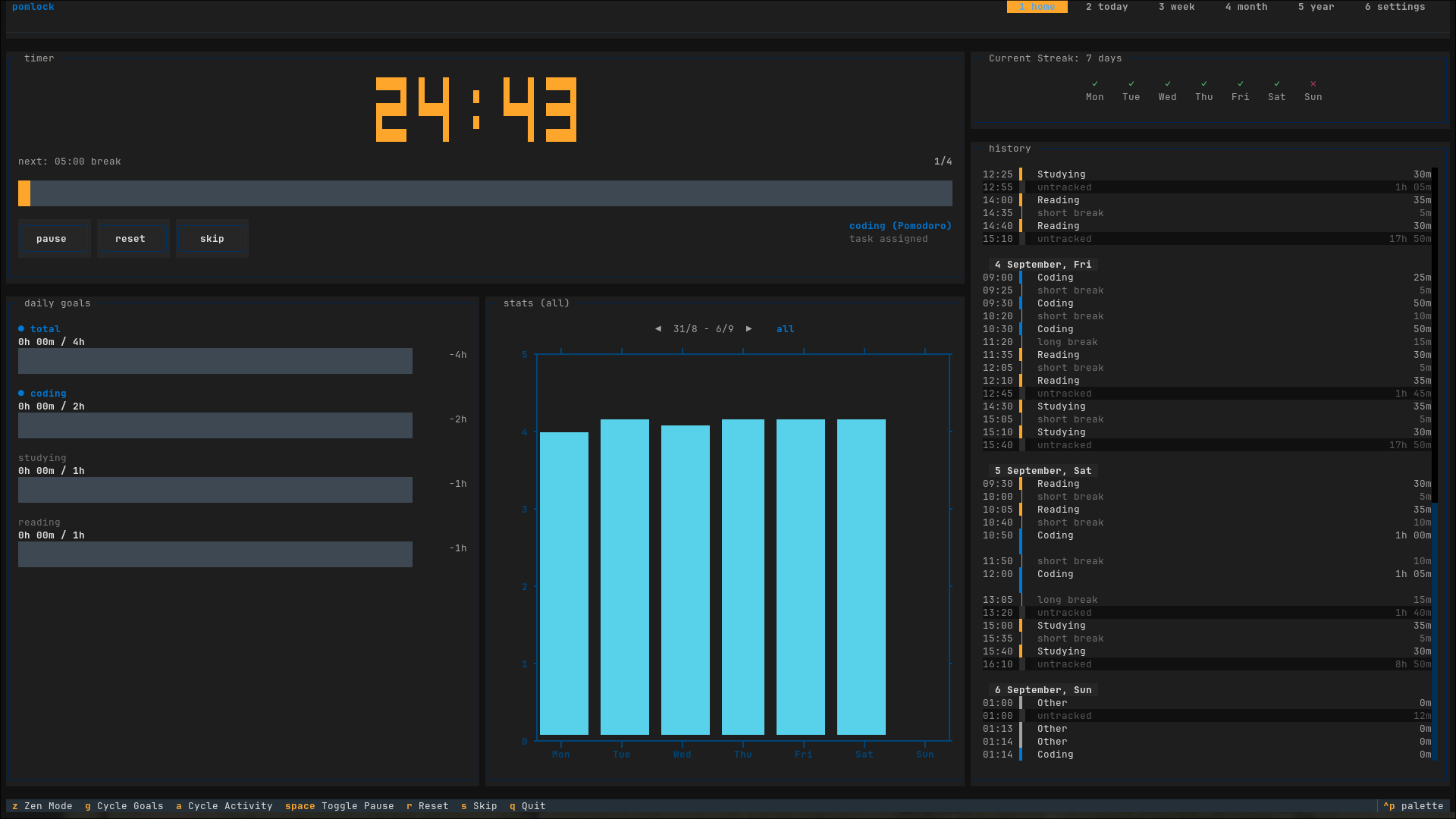
No Electron bloat. The timer, calendar stats, streak trackers, and configuration menus run right inside your shell.
Preset & custom rhythms
Switch between standard 25/5, 90/20 ultradian cycles, 50/10 sessions, or define custom intervals like "45 10 20 3".
Status bar JSON output & script callbacks
Writes live state to /tmp/pomlock.json for Waybar/Polybar. Executes custom scripts on phase changes with JSON event data.
Activity setup & daily streaks
Categorize sessions under custom activities and track consistency with gap-respecting daily streaks across days and weeks.
Single-keypress terminal controls.
| [ KEY ] | ACTION PERFORMED |
|---|---|
| Space | Pause or resume active timer |
| s | Skip current interval |
| r | Reset current interval |
| z | Toggle zen view |
| g | Cycle activity goals |
| a | Cycle chart activity filter |
| 1 | Switch to home screen |
| 2 - 5 | Today, Week, Month, and Year stats |
| 6 | Settings screen |
| q | Quit application |
Plain text configuration, native shell hooks.
Edit directly in your text editor or inside the TUI app by pressing 6.
[general]
block_input = true
notify = true
break_notify_msg = Time for a break!
long_break_notify_msg = Time for a long break!
pomo_notify_msg = Time for a pomodoro!
callback =
timer = standard

[presets]
standard = 25 5 20 4
ultradian = 90 20 20 1
fifty_ten = 50 10 10 1

[overlay]
enabled = true
font_size = 48
color = white
bg_color = black
opacity = 0.8

[activities]
auto_calc = false
daily = 4h
weekly = 30h

[streak]
allowed_gap = 1
indicator_style = icon

[localization]
week_start_day = monday
locale = en_USPomlock writes live state to /tmp/pomlock.json every second while running:
{
  "action": "pomodoro",
  "time": 1500,
  "start_time": 1725580800.0,
  "crr-cycle": 1,
  "total-cycles": 4,
  "state": "running"
}
Add this custom module to your Waybar configuration to display timer status in your bar:
"custom/pomodoro": {
  "exec": "/path/to/waybar.py",
  "interval": 1,
  "return-type": "json",
  "on-click": "/path/to/waybar.py left",
  "on-click-right": "/path/to/waybar.py right"
}Set a callback command and pomlock
runs it on every phase change, passing a JSON object as the last argument:
{
  "action": "pomodoro|short_break|long_break",
  "time": 1500,
  "start_time": 1725580800.0,
  "crr-cycle": 1,
  "total-cycles": 4,
  "crr-session": 1
}
Example callback in your pomlock.conf:
callback = uv run /home/luisca/p/scripts/pomlock_brainfm.pyOr pass a script directly at launch:
pomlock --callback /path/to/script.sh